Commercial kitchen exhaust cleaning is easier to defend when the crew follows one documentation workflow from the hood line to the roof and then into the customer report.
The cleaning work matters, but the customer, property manager, insurer, or fire marshal may later need a record of what was in scope, what was accessible, what the crew cleaned, what they found, and when service is recommended again. A folder of unlabeled photos and a short invoice rarely answers those questions.
This workflow gives kitchen exhaust cleaning contractors a practical sequence for documenting the job without turning the report into a code opinion. It supports a clear service record. It does not replace the current standard, local requirements, a qualified inspection, or authority having jurisdiction direction.
For a field-ready pre-job list, use the commercial kitchen hood cleaning checklist. For a report structure after the job, try the free hood cleaning report template generator.
Start with the service record before the crew begins
Good documentation starts before degreaser, covers, or ladders come out. Confirm the information that identifies the exact job and the systems the crew expects to service.
Record:
- Customer and service location
- Onsite contact and preferred report recipient
- Service date, work order, invoice, or job number
- Hood line, cookline, and exhaust fan names or IDs
- Planned cleaning scope
- Known access points, roof access requirements, and safety limits
- Current service frequency and last known service date
- Customer instructions, exclusions, or special handoff requirements
A location may have a main cookline, prep hood, dishwasher hood, and multiple fans. Name each system before work starts. This keeps photos, notes, and deficiencies attached to the right equipment instead of becoming one generic kitchen record.
Document the accessible scope at the hood line
At the kitchen level, capture the condition of the components the crew is actually servicing. The report should separate completed cleaning from anything outside scope or inaccessible.
For each hood system, document the applicable components:
- Hood interior and canopy
- Plenum
- Filters, baffles, troughs, and cups
- Duct access openings
- Accessible vertical or horizontal duct sections
- Fan ID connected to the hood line
- Areas excluded from approved scope
Capture a clear before photo before cleaning and a matching after photo before moving on. The pair should show the same component from a useful angle. A label such as Main cookline plenum, after cleaning tells the reader much more than a camera filename.
Use the hood cleaning photo checklist generator when crews need a component-by-component shot list.
Build one before-and-after evidence trail
A useful photo pair identifies the same system and component before and after work. The illustrative hood pair below is not a substitute for field photos. On an actual job, label both images with the hood line, component, and condition so the customer can connect the visual record to the written scope.
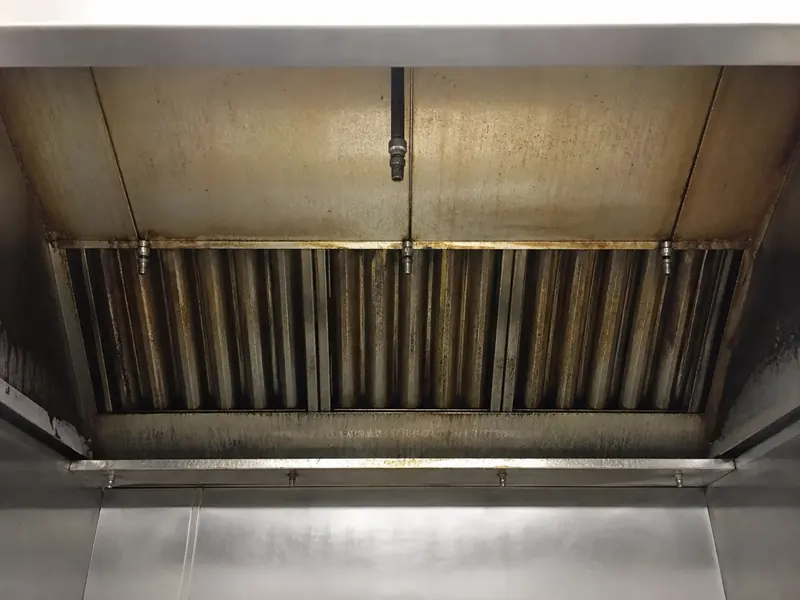
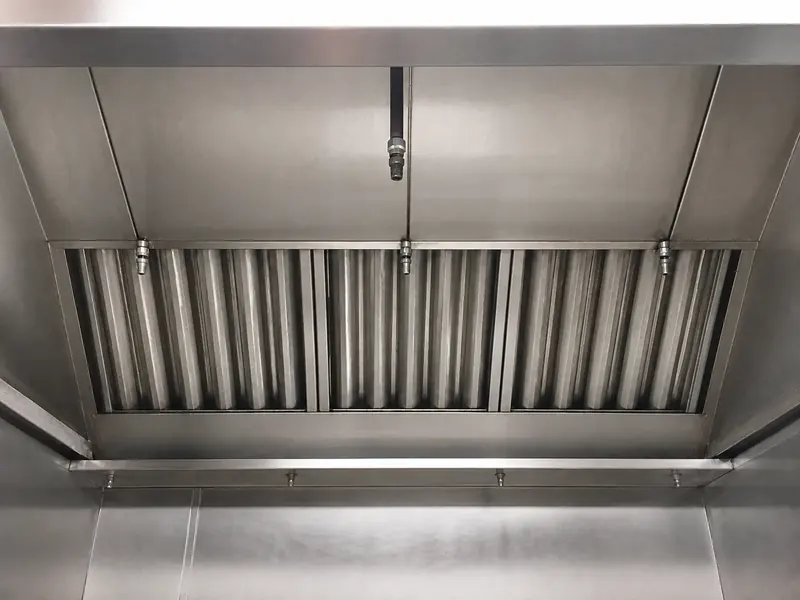
For example, a field record can tie the pair to a specific completed scope:
Main cookline hood and plenum: accessible interior, filters, and grease trough were cleaned. Before-and-after photos are attached. Rear horizontal duct section was not accessed and is listed separately in the access notes.
This gives the reader a clear distinction between documented work and an area that was not verified or cleaned. Add the fan and rooftop evidence under the same system name so the report follows the job from the cookline to the roof.
Treat duct access as its own checkpoint
Duct access determines what the crew can inspect and clean. It should not be hidden inside a general completion note.
For every access point used, note:
- Access panel or opening location
- Whether the panel was accessible and safe to open
- Duct direction or section reached
- Condition before cleaning when visible
- Cleaning completed in the accessible section
- Any panel, clearance, lockout, or structural issue that limited access
If the crew cannot access a section, document the limitation with a photo. State the component, the reason it could not be reached, the service impact, and a practical next step.
Rear horizontal duct section above the prep ceiling could not be accessed because no access panel was available. The concealed section was not verified or cleaned. Recommend approved access installation before follow-up service.
That note is factual and useful. It does not claim a code conclusion or imply that work was completed where access was unavailable. For more examples, read how to document missing access panels in a hood cleaning report.
Capture rooftop and exhaust fan evidence
The roof section is often where reports become incomplete. The fan can be connected to a hood system in the kitchen, but the photo evidence and notes are taken far from the cookline. Use the same system name or fan ID in both places.
For each fan in scope, document:
- Fan ID, roof location, or associated hood line
- Fan bowl and blades before cleaning
- Fan bowl and blades after cleaning
- Fan curb and nearby rooftop grease condition
- Grease containment condition when included in scope
- Whether the fan opened safely
- Any hardware, electrical, access, or condition concern observed
If a fan cannot be opened safely, do not write a normal completion note. Photograph the condition and explain the limit.
EF-2 fan hinge hardware was damaged. The fan could not be opened safely, so the bowl and blades were not verified or cleaned. Recommend qualified repair and follow-up service.
Use the hood cleaning deficiency note generator to create a clear starting point for customer and technical notes. Confirm the final language matches what the crew observed.
Keep deficiencies separate from completed work
A service report should make it easy to tell what was cleaned from what needs customer action. Deficiencies belong in a dedicated section, not at the end of a broad technician note.
Each deficiency should include:
- System, component, or location
- Condition observed
- Photo evidence
- Service impact
- Recommended next action
- Follow-up owner or timing when known
Examples include missing access panels, damaged filters, fan hardware problems, rooftop grease containment issues, blocked roof access, and areas excluded from scope with heavy buildup. Keep the language specific and bounded. Contractors can document an observed condition and recommend next steps without representing an AHJ or certifying compliance.
Set the next service recommendation before closeout
The customer should not have to search a separate email to learn when service is recommended next. Put the current frequency and next service date in the report with the information used to make the recommendation.
Include:
- Current or requested cleaning interval
- Recommended next service date
- Cooking operation or load notes that affect the schedule
- Solid fuel, wok, charbroiler, high-volume, 24-hour, or seasonal operation notes when applicable
- Any stricter customer or local requirement communicated to the crew
A frequency recommendation supports planning. The customer and contractor should still verify current requirements with the authority having jurisdiction and applicable customer rules. The kitchen exhaust cleaning frequency calculator can help explain a practical service interval.
Review the full record before leaving the site
A short review at the truck prevents office rework and customer follow-up later. Before the crew leaves, confirm the report has a coherent trail from the hood line to the roof.
Use this closeout checklist:
- Confirm the correct customer, location, date, and contact.
- Confirm every hood line and fan in scope is named.
- Check that required before-and-after photos are present and labeled.
- Verify that accessible duct sections and access limitations are documented.
- Keep completed work, exclusions, and deficiencies in separate sections.
- Record the next service recommendation and date.
- Add technician completion notes in plain language.
- Confirm the customer acknowledgement or report delivery contact.
- Review the PDF or share link as the customer will see it.
For a broader multi-truck quality process, see how to standardize reports across multiple hood cleaning crews. Before building the final record, run the completed job through the commercial kitchen exhaust documentation grader to check scope, access notes, photos, deficiencies, next service date, and handoff details in one pass.
Deliver a record the customer can retrieve later
A completed commercial kitchen exhaust cleaning job should end with a usable customer record, not a collection of disconnected files. The final report should show the job details, system scope, accessible areas cleaned, photo evidence, access limits, deficiencies, next service recommendation, and a durable delivery method.
A PDF gives the customer a fixed copy. A share link gives them a practical way to retrieve the record later. Both should make the scope and open items easy to find.
HoodCleaningReport helps kitchen exhaust cleaning contractors turn field photos, job notes, access limitations, deficiencies, next service dates, and customer acknowledgement into branded reports, PDFs, and share links.
You can review a sample report, build a hood cleaning report template, compare hood cleaning report software, view pricing, or create your first report when you are ready to standardize the handoff after every job.
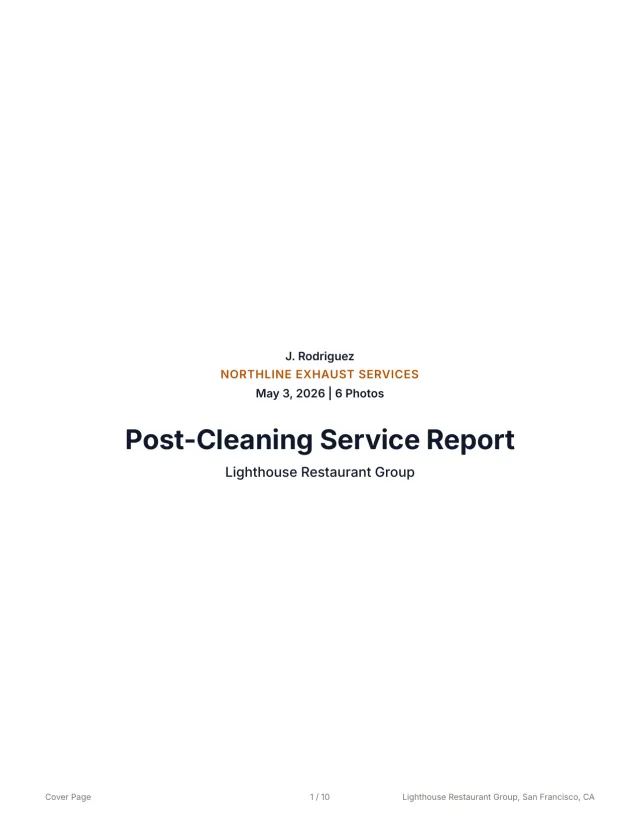 See a finished report The 10-page sample, the Certificate of Service, and the 3x5 sticker from one job.
 Related guides
Keep building the report record
Use this hood cleaning job closeout checklist to verify photos, scope, deficiencies, next service dates, and customer report delivery before the crew leaves.
Operations How to Standardize Reports Across Multiple Hood Cleaning CrewsUse this hood cleaning crew checklist to standardize field photos, notes, deficiencies, quality review, and customer-ready reports across every truck.
Operations Commercial Kitchen Hood Cleaning Checklist for CrewsUse this commercial kitchen hood cleaning checklist to standardize setup, hood, duct, fan, photos, deficiencies, frequency, signoff, and report handoff.
Send your next job as a finished report.
Your photos become a branded report, a Certificate of Service, and a 3x5 sticker, under one job number.
3 reports or 3 days free. No card.