A hood cleaning job is not fully closed when the crew finishes the last fan or packs the truck. It is closed when the customer can receive a clear record of what was serviced, what could not be accessed, what needs follow-up, and when to schedule the next visit.
This hood cleaning job closeout checklist gives contractors a final field review before the crew leaves. It is designed for the handoff between the technician, office, customer, property manager, or authority having jurisdiction. It supports a complete service record. It does not replace current standards, local requirements, customer requirements, or authority having jurisdiction direction.
If your crew needs a checklist before work begins, use the commercial kitchen hood cleaning checklist for crews. If you need a report structure after the job, start with the free hood cleaning report template generator.
Why a hood cleaning job closeout checklist matters
Most report problems are created in the last few minutes of the job. The crew has completed the cleaning, but a fan photo is missing, a locked access point is not explained, the next service date is left in a text message, or a deficiency is buried in a general note.
That creates avoidable office rework and weakens the customer handoff. A short closeout review gives the crew one repeatable way to confirm the record before details are lost.
Use it to answer five questions:
- Is the correct job and system scope identified?
- Is there useful before-and-after evidence for the work completed?
- Are access limits and deficiencies separate from completed work?
- Is the next service recommendation visible?
- Does the customer have a clear PDF or share-link handoff?
1. Confirm the job, location, and report recipient
Start with the fields that identify the exact visit. They should match the work order, invoice, or customer record before the report is delivered.
Check:
- Customer and facility name
- Full service address and store or location ID when applicable
- Onsite contact and the report recipient
- Service date and completion time
- Work order, invoice, or job number
- Technician or crew lead
- Service type, such as inspection, routine cleaning, re-clean, or follow-up
For multi-location restaurant groups, the store number is often as important as the brand name. It prevents a report from being sent to the wrong facility or mixed with another location’s history.
2. Match every hood and fan to the work performed
A customer should not have to guess which system a photo or note refers to. Before closing the job, confirm every hood line and exhaust fan in scope is named consistently in the report.
For each system, verify:
- Hood, cookline, or system name
- Associated fan ID or roof location
- Components cleaned, such as hood interior, plenum, filters, duct access section, fan bowl, blades, curb, or containment
- Areas excluded from approved scope
- Any system not serviced and the reason
Use the same names in the kitchen and on the roof. For example, if the kitchen report says Main cookline, the rooftop fan evidence should say EF-1, main cookline. This keeps the record understandable on a later inspection or follow-up visit.
3. Review before-and-after photo evidence
Photos are strongest when a reader can compare the same component before and after cleaning. Do not wait for the office to discover that all of the after photos are unlabeled or that a required system has no evidence.
For every system in scope, confirm applicable photo pairs for:
- Hood interior and plenum
- Filters, baffles, troughs, and cups
- Duct access openings and accessible duct sections
- Fan bowl and blades
- Fan curb, rooftop grease conditions, and containment when in scope
- Areas with unusual buildup or customer-visible conditions
Photo labels should say what the reader is seeing. EF-1 fan bowl after cleaning is more useful than a camera filename. For a component-by-component shot list, use the hood cleaning photo checklist generator.
4. Separate access limitations from completed work
A complete report should be clear about where the crew could work and where access was unavailable or unsafe. Never use a normal completion note to cover an inaccessible section.
For every access limit, record:
- The specific component or location
- Why the area could not be accessed
- Whether the area could be verified or cleaned
- A photo of the condition or obstruction when practical
- The customer action or follow-up needed
For example:
Rear horizontal duct section above the prep ceiling could not be accessed because no access panel was available. The concealed section was not verified or cleaned. Recommend approved access installation before follow-up service.
This note explains the service boundary without claiming a code conclusion. For additional examples, see how to document missing access panels in a hood cleaning report.
5. Put deficiencies in their own section
Deficiencies and completed cleaning are different facts. A customer should be able to find an observed condition without reading every technician note.
Before delivery, check that each deficiency includes:
- System, component, or location
- Observed condition
- Photo evidence when available
- Service impact
- Practical recommended next step
- Follow-up owner or timing when known
A useful deficiency note states what the crew found, what it affected, and what should happen next. The free hood cleaning deficiency note generator can help crews draft a clear starting point. The final report should always match the condition actually observed.
6. Confirm the next service recommendation
The report should make the next recommended service date easy for the customer to find. It should not be left in a calendar reminder, verbal conversation, or separate email.
Before closeout, verify:
- Current or requested service interval
- Recommended next service date
- Cooking operation details that affect the interval
- Any solid fuel, wok, charbroiler, high-volume, 24-hour, seasonal, or customer-specific factors noted by the crew
- Any stricter customer or local requirement the contractor has been asked to follow
The kitchen exhaust cleaning frequency calculator can help contractors explain a practical interval. The customer and contractor should still verify current requirements with the authority having jurisdiction and applicable customer rules.
7. Review the report as the customer will receive it
The final document should make the work easy to understand without a phone call to the technician. Before sending it, open the PDF or share link and review it as the customer or property manager would.
Confirm that it shows:
- Job and location details
- System scope and completed work
- Before-and-after evidence
- Access limitations and exclusions
- Deficiencies separated from completion notes
- Next service recommendation
- Technician completion note and customer acknowledgement when available
- Contractor contact information
For a visual reference, review a sample hood cleaning report. A report that is clear to the office but difficult for the customer to retrieve or interpret is not a complete handoff.
8. Record the delivery and follow-up path
The last closeout step is confirming where the record goes. Assign the recipient and note the delivery method while the customer contact is still available.
Choose and record one or more of these handoff paths:
- Branded PDF sent to the customer or facility contact
- Share link provided for the customer record
- Customer acknowledgement captured when available
- Follow-up work assigned for a deficiency or access issue
- Next service reminder created
A share link can help a customer retrieve the report later, while a PDF provides a fixed copy for their records. Both should clearly identify the contractor, facility, visit date, and next action.
A 60-second hood cleaning closeout checklist
Use this field-ready version before the truck leaves:
- Confirm customer, location, date, job number, and report recipient.
- Name every hood system and associated fan in scope.
- Confirm completed work and excluded areas are separated.
- Check required before-and-after photos and useful labels.
- Document inaccessible areas with the reason, service impact, and next step.
- Put each deficiency in a dedicated section with evidence and recommendation.
- Record the current interval and next service recommendation.
- Add the technician completion note and customer acknowledgement when available.
- Review the PDF or share link for clarity and correct branding.
- Confirm delivery, follow-up owner, and next-service reminder.
Make closeout repeatable across every truck
The best closeout checklist is the one every crew can complete without relying on memory. A consistent sequence reduces office cleanup, gives customers a clearer record, and makes it easier to see recurring gaps in field documentation.
HoodCleaningReport helps kitchen exhaust cleaning contractors turn job photos, scope, access limitations, deficiencies, next service dates, and customer acknowledgement into branded reports, PDFs, and share links.
You can try the hood cleaning report template, print the hood cleaning sticker, compare hood cleaning report software, view pricing, or create your first report when you are ready to standardize closeout after every job.
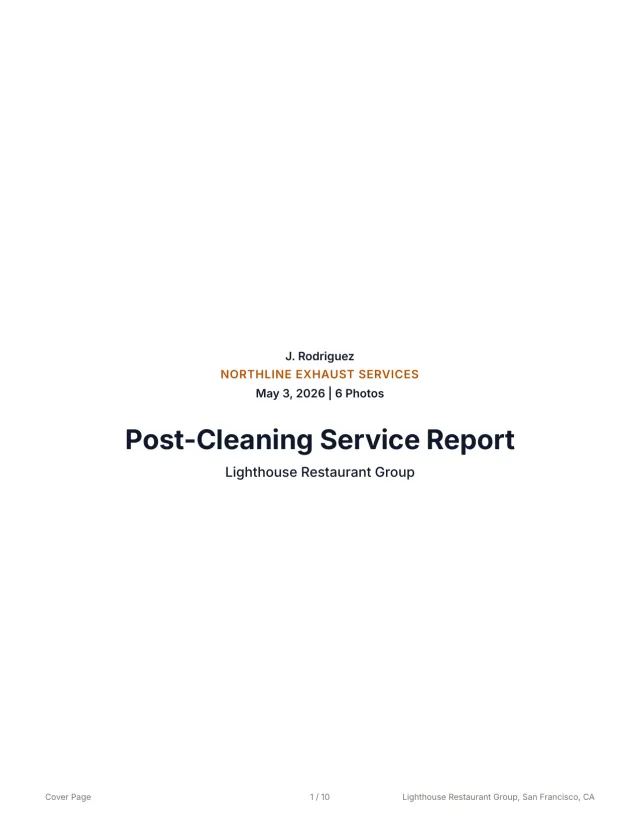 See a finished report The 10-page sample, the Certificate of Service, and the 3x5 sticker from one job.
 Related guides
Keep building the report record
Follow a kitchen exhaust cleaning documentation workflow from roof access and system scope to photos, deficiencies, service dates, and customer handoff.
Operations How to Standardize Reports Across Multiple Hood Cleaning CrewsUse this hood cleaning crew checklist to standardize field photos, notes, deficiencies, quality review, and customer-ready reports across every truck.
Operations Commercial Kitchen Hood Cleaning Checklist for CrewsUse this commercial kitchen hood cleaning checklist to standardize setup, hood, duct, fan, photos, deficiencies, frequency, signoff, and report handoff.
Send your next job as a finished report.
Your photos become a branded report, a Certificate of Service, and a 3x5 sticker, under one job number.
3 reports or 3 days free. No card.